




- 30-денна гарантія повернення грошей
- Automatic WordPress updates, Free domain and SSL included
- 24/7 customer support available


- 30-денна гарантія повернення грошей
- В 3 рази швидше з SSD та кешуванням, щоденні резервні копії та легке відновлення
- Підтримка доступна 24/7/365 через чат, телефон, електронну пошту, квитки
Strato vs IONOS: Quick Summary
After testing both, IONOS comes out on top. It gave me more control, smoother management, and faster support when I needed it, without hitting any roadblocks.
I liked how easy it was to scale from a simple site to something more advanced. Strato was quick and reliable, but it felt more limited and harder to manage without round-the-clock help.
Overall, IONOS just made the whole experience easier and more flexible.
1. Prices and Plans Comparison
When I looked at the full hosting lineup, Strato starts off cheap, like IONOS, at €1 per month (around $1.14) for shared and WordPress hosting plans, but its prices jump up significantly after the promo period.
For example, their top shared or WordPress plan goes from €1 to €18 per month (about $20.52).
IONOS, on the other hand, offers unlimited storage and websites for $1 per month for a whole year, with minimal increases after that. On VPS, IONOS starts at $ 2 per month, compared to Strato’s €10 (approximately $11.40). And with dedicated servers, IONOS offers a wider range and more affordable entry points than Strato’s €34/month (approximately $38.76).
Simply put, IONOS gives you more room to grow without the pricing getting out of hand.
2. Customer Support Comparison: Who’s Got Your Back?
IONOS Offers Faster and More Flexible Support.
IONOS Customer Support
To test IONOS’s customer support, I used both phone support and live chat, and also browsed their Help Center.
Phone Support Test
From my dashboard, I clicked on the help icon and was prompted to choose a topic. I selected “Server and Cloud Infrastructure,” and IONOS immediately gave me:
- A dedicated support phone number
- My customer ID
- A temporary PIN for verification

I called the number and asked whether IONOS provides firewall tools for VPS or if I had to configure everything manually. The representative responded quickly and explained that:
- IONOS does offer a built-in firewall tool within the Cloud Panel.
- However, users must still configure server-side rules using tools like iptables (Linux) or Windows Firewall.
- By default, most inbound traffic is blocked until you explicitly allow it.
The rep was knowledgeable, direct, and efficient. No long wait times, no transfers.
Live Chat Test
Next, I tested the live chat. I accessed it from the help section, and at first, I was connected to a chatbot. After agreeing to save conversation history, I asked the same firewall question.
The chatbot didn’t answer directly but said, “Let me connect you to an agent.” About one minute later, a real person joined the chat. The agent confirmed that firewall tools are available in the Cloud Panel and even sent me a link to the official documentation.
So while the chatbot felt like a slight delay, once I got through, the human support was excellent.

Knowledge Base
IONOS also has a solid Help Center. I looked through articles on VPS setup, WordPress installations, and backup strategies. The guides are clear, organized, and technical without being overwhelming. Ideal for beginners and advanced users alike.

You’ll see dedicated sections for everything from domains and email to hosting and server configuration. The “Help” area is easy to find, and live support is just a couple of clicks away.
Strato Customer Support
Next, I moved on to Strato to test their support. Their primary method is phone support, so I wanted to compare it.
Phone Support Test
I called Strato’s hotline: 020 – 703 82 32, available Monday through Friday, 8:00–20:00. Before calling, you need your customer number and service PIN, both of which are available in the dashboard.
I asked a technical question: How do I set up a reverse proxy using NGINX on a VPS?
The support rep was clear and helpful, walking me through the NGINX configuration steps and explaining how traffic could be routed. They were technically competent and answered my question without reading from a script.
The downside? No 24/7 support. If it had been the weekend or after business hours, I would’ve been stuck.
Knowledge Base
Strato’s also offers a Knowledge Base, which is quite good. I found articles on topics like email setup, hosting packages, HiDrive storage, and DNS records. Most articles are detailed and include screenshots, making them easy to follow.

However, there is no live chat or email support. So if you can’t get your issue solved by reading an article or calling during business hours, you’re out of luck.
Winner Snapshot
IONOS is the clear winner for support. Not only do they offer 24/7 service, but they also provide multiple channels, phone, live chat, and email. Their support team was fast and knowledgeable, and I never had to wait long. Strato’s phone support was solid during business hours, but the lack of round-the-clock help and live chat makes it less reliable for time-sensitive issues.
3. Hosting Features Comparison
IONOS Offers More Features for Less Money.
IONOS Features
One of the biggest advantages I noticed with IONOS is how generous their resource limits are, even on the cheapest plans.
With the Plus plan, I was able to host unlimited websites and got access to unlimited storage and databases, a rare find at this price point. The hosting backend is clean and fast, and everything from adding domains to managing WordPress installations felt smooth.
I appreciated that SSH and WP-CLI access were enabled by default, so if you’re a developer or even semi-technical, you get full control without needing to upgrade.
Their security setup also stood out. All plans come with daily backups, malware scanning, and DDoS protection. You also get a Wildcard SSL certificate, which secures your domain and subdomains without any extra configuration.
IONOS offers a custom control panel instead of cPanel, but I didn’t feel like I was missing anything. It’s intuitive and supports features like PHP version switching, email setup, and resource scaling.
The AI website tools are also handy if you’re in a rush or helping someone non-technical build a site from scratch. Overall, it’s very feature-rich without being overwhelming.

Strato Features
Strato has a solid feature set, but it leans more toward users who plan to host a single project. Each plan includes one domain, one website, and a generous amount of SSD webspace, up to 200 GB on the top-tier plan.
I set up a test site using their Hosting Pro plan and found the interface to be straightforward, with easy 1-click installs for WordPress, Joomla, and Drupal. It’s a good fit for bloggers, freelancers, or small businesses that just want a reliable website without having to juggle too many settings.
The email setup is also practical, with 1 to 5 mailboxes, each offering 3 GB of storage, along with features such as antivirus protection, spam filters, and webmail. What Strato really emphasizes is security and sustainability.

Their BackupControl tool automatically creates multiple daily backups, and their servers are hosted exclusively in Germany, meeting strict GDPR and ISO 27001 standards.

They also promote green hosting with CO₂-neutral energy and data center efficiency.
While Strato doesn’t offer free migrations or multi-site support, the platform is stable, secure, and optimized for privacy, which some users will value more than scalability.
4. Website Performance Comparison
Strato Delivers Faster Page Loads and Lower Blocking Times.
When it comes to hosting, speed is one of the most significant factors in user experience and revenue. Slow websites frustrate visitors, increase bounce rates, and can tank your SEO.
IONOS Performance
The GTmetrix report showed:
- Page Load Time: 2.1 seconds
- Largest Contentful Paint: 1.5s – which is within Google’s recommended range, but not lightning-fast
- Total Blocking Time: 198ms – some room for optimization, especially if the site gets heavier with plugins or traffic
- TTFB: 536ms – the backend could respond faster

Overall, IONOS performed reasonably well. The setup is clearly optimized for WordPress, and the backend performance is decent. But it’s not blazing fast, and on heavier sites or longer traffic spikes, the blocking time might become a bottleneck.
Strato Performance
And this is where things got impressive:
- Page Load Time: Just 827ms
- LCP: A stunning 518ms
- Total Blocking Time: 0ms
- TTFB: A very responsive 101ms

From start to finish, Strato’s site loaded in under a second and felt almost instantaneous. The low TBT and perfect CLS (0) indicate it’s not just fast, but also stable and visually consistent. Pages don’t shift around as they load, and users can interact with content in half the time compared to IONOS.
This test gave me a clear picture of how both hosts perform under the same conditions. IONOS isn’t bad, but Strato is clearly faster in nearly every key metric.
If speed is your top priority, especially for users in Europe, Strato has the edge.
IONOS might still be a strong choice if you’re looking for more robust cloud tools or advanced infrastructure, but when it comes purely to performance out of the box, Strato wins.
5. Ease of Use Comparison: Which Platform Is Easier to Use?
IONOS wins for ease of use thanks to its more intuitive interface, faster setup process, and better control over server and website tools.
I started by testing how easy it is to register and create an account with each provider. This part is crucial because if a platform gives you a hard time right from the signup process, it’s not a good sign for what comes next.
Registration and Creating a New Account
Signing up for IONOS was quick and beginner-friendly. I headed to the IONOS homepage, hovered over the “Hosting” tab, and selected VPS Hosting to test a plan that offers full control.

On the next screen, I clicked See Plans, then chose the VPS XXL plan. I appreciated that IONOS allowed me to configure several things before checkout. I picked Ubuntu 24.04 as the operating system and set the data center location to the United States.

I also saw the option to include Cloud Backup powered by Acronis for extra data protection. I skipped the optional Agency Partner Program, then added the plan to the cart and clicked Continue.
On the checkout page, I filled in my details—name, address, phone number, and email—and selected my payment method. IONOS accepts:
- Credit cards
- PayPal
- Apple Pay and Google Pay
Once I submitted the form, I was redirected to a confirmation page that listed all my server details, including login credentials and IP addresses. I also received an instant confirmation email with all the necessary information to get started.
The whole experience was fast and smooth. I didn’t get stuck anywhere, and everything was clearly explained.
Next, I visited Strato’s website to compare its signup process.
From the homepage, I hovered over “Server” and selected VPS Linux.

I picked the VC6-16 plan and clicked Order Now. Strato showed me a product configuration screen, where I could add extras like SSL certificates and Cyber Protect (for malware and ransomware protection). I appreciated that level of control upfront.

After that, I was taken to the cart, then asked to enter my customer details. I filled in my name, address, email, and phone number.
Before finalizing the purchase, I had to confirm my order using a code sent via SMS. This adds a layer of security, but it did slow things down a bit compared to IONOS. Still, within minutes, I had access to my dashboard.
Both were easy, but IONOS was a little faster and more fluid overall. The layout was better, and the payment options were more flexible.
User Interface – Client Area and Dashboard
After signing up, I wanted to explore each provider’s client dashboard, since that’s where you’ll spend a lot of time managing your hosting services.
After completing the signup and server setup, I landed on the IONOS dashboard, a clean, well-organized interface that instantly made me feel in control.
At the top, there’s a friendly greeting (“Welcome XXXX”) and a clear prompt: Select the product you would like to use… Right below that, IONOS provides a helpful reminder to check your visitor statistics, accompanied by a dedicated button to access those statistics.

This is part of their Web Analytics tool, which tracks the number of visitors, the time they spend on the site, and which pages perform best. It’s a subtle yet smart way to nudge users to keep track of their site’s performance.
What stood out most to me was the layout of the main dashboard. Everything is laid out in big, labeled blocks, making it easy to know where to go next:
- Domains & SSL – Manage your domains and install security certificates.
- Email – Set up and manage email accounts linked to your domain.
- Websites & Stores – Launch or manage your WordPress, Joomla, or online store setup.
- Hosting – Access your files, databases, and webspace.
- Servers & Cloud – This is where you manage your VPS or dedicated server.
- Security Solutions – Add tools like backups, malware protection, and DDoS protection.
- My Account – View and edit invoices, contracts, and personal details.
- Add another product – If you need more services, like another VPS or a new domain, this is the spot.
Everything is icon-driven, spaced out, and not overwhelming, which I appreciated. Unlike many providers that throw you into a sidebar-heavy UI packed with technical terms, IONOS takes a beginner-friendly approach without sacrificing control for advanced users.
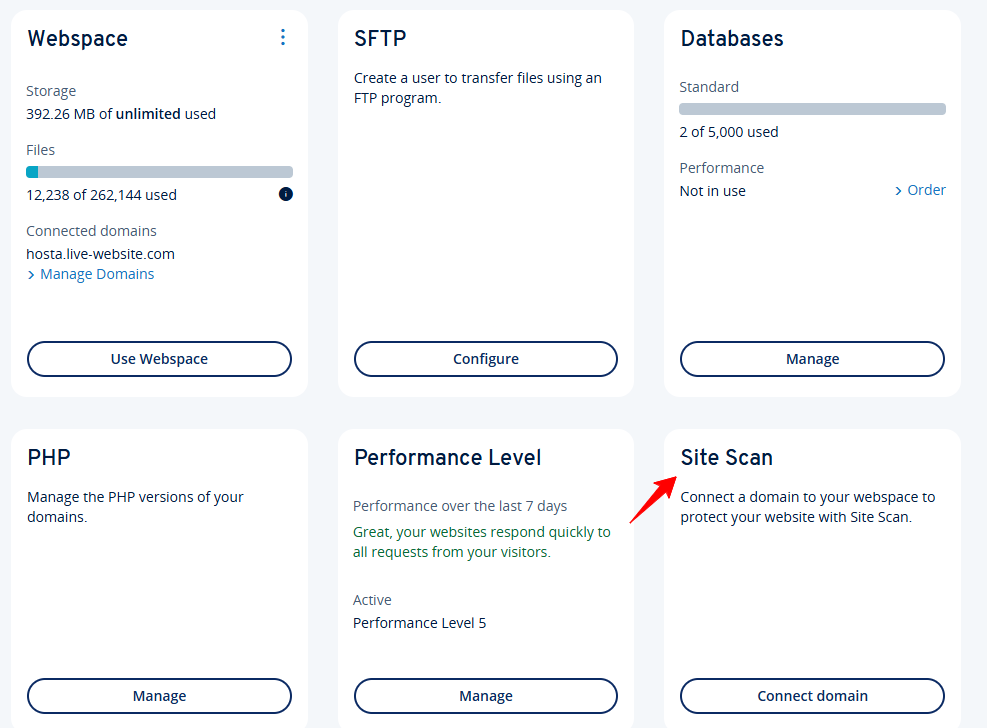
To the right, there’s a small security panel that prompts you to explore IONOS’ protection tools. This is where they offer services such as site scanning, cloud backup, and enhanced firewall options.
Navigating this dashboard was intuitive and quick. Whether you’re launching your first website or managing a VPS, you’re never more than a click or two away from what you need.
Next, I looked at the Strato dashboard.
Once I logged in, I landed on the “Package overview” screen. At the top, there was a personalized greeting: “Hello XXXX,” along with the Service Pin and Customer Number clearly displayed. That’s handy when contacting support, since you don’t have to dig around for your account info.

The left-hand sidebar is your main navigation menu. It’s neatly categorized and includes sections like:
- Overview of your packages – Lists your current hosting plans and server subscriptions.
- Change customer data & password – Update your personal details.
- Two-factor authentication – Boost account security.
- Processor agreement & data inspection – Important for GDPR compliance and transparency.
- Online invoice – View, download, and track your payments.
- Your contract – Manage or cancel services.
- Current offers – Browse promos from Strato.
In the middle of the page, under Package type, you’ll see a clear breakdown of the services you’ve purchased. For me, I had two listed:
- Hosting Advanced, which was active and listed with its domain name.
- VPS Linux VC6-16, which unfortunately showed a “blocked” status in red. Strato uses this visual cue to alert you immediately if something’s wrong, like billing issues or a paused service.
Even though one of my services was blocked at the time, I appreciated that Strato didn’t hide this. It was front and center, which makes troubleshooting or reactivating services faster. There’s also an “Order more products” link right below the list, so you can easily upgrade or expand your hosting.
Overall, I found the Strato dashboard clean and straightforward. It’s not flashy, but everything is where you’d expect it to be.
That said, compared to IONOS, Strato’s dashboard feels a bit more administrative-focused, less polished in design, but functional and to the point.
Hosting Setup – Creating a WordPress Website
I wanted to see how easy it was to set up a WordPress site with each provider. That’s often one of the first things users want to do.
I started with IONOS. From the Websites & Stores section in the dashboard, I clicked Create new website or store.

On the next page, I was given several options: Sell Online, Start Hosting a Project, Add an Existing Website, and Create a WordPress Project. Since I was specifically testing how beginner-friendly WordPress hosting is, I selected “Create a WordPress Project.”

A pop-up appeared prompting me to pick a hosting plan. IONOS automatically suggested the WordPress Grow plan. Just beneath it, I saw optional upsells like:
- Site Scan & Repair (free for 1 month, then $6/month)
- eCommerce Plugin for turning your site into an online store (free for 1 month, then $5/month)
- Domain Guard for protecting your domain (first year $1, then $15/year)
I opted out of these upsells since I wanted to focus purely on the core experience. I reviewed the order summary, accepted the General Terms and Conditions, and clicked Order Now.
A message popped up saying: “WordPress Setup is currently in progress.” After about two minutes, my hosting was ready.

To finalize the setup, I went to the My Account section and found my new WordPress project listed there. Clicking on it launched a short and well-structured setup wizard.

Here’s the flow:
- Project Name: I entered a name for the site.
- Language Selection: I selected the admin language for the dashboard.
- Admin Credentials: I created a WordPress username, set a password, and entered an admin email.
- Theme & Layout: IONOS gave me a few clean starter themes to pick from. I selected one to move forward.
- Launch WordPress: After completing the setup wizard, I clicked Launch WordPress, and I was immediately inside the WordPress dashboard, with no additional logins or steps required.
Everything was fast, clean, and clear. Even though it’s beginner-friendly, IONOS doesn’t oversimplify the experience. It provides sufficient control over details such as admin credentials, theme selection, and performance settings, while keeping the process straightforward enough for anyone to complete in a few minutes.
Next, I went to Strato. Strato also provides one-click WordPress installation, but the steps were slightly more manual.
I started by logging into the control panel. Under the Applications tab, I selected WordPress and clicked Install this application.

I had to:
- Set the directory (or leave it blank for root installation)
- Create a username and password for the admin panel
- Double-check pre-filled values like database names and email
After clicking “Install,” the setup ran for a minute or two, and then I received a confirmation email with login credentials.
It worked fine, but there were more manual fields, and no guided setup wizard was available like with IONOS.
IONOS was quicker, smoother, and more polished for WordPress setup.
Server Management Dashboard
Finally, I wanted to evaluate how easy it is to manage a server on each platform. Good server management tools are critical, especially for VPS users, so I was looking for clarity, flexibility, and control.
To manage my IONOS VPS, I clicked on “Servers & Cloud” in the dashboard.

This pulled up a clean overview of all my servers. Each server showed:
- Name and status
- Location
- IPs
- OS
- Usage stats
Clicking into the server gave me access to:
- SSH login credentials
- Firewall rules
- Reboot options
- Resize features
- Backup management

The layout was clear and responsive. I could make changes without needing to contact support or read documentation. IONOS made advanced server tools approachable even for less technical users.
After testing IONOS, I wanted to see how Strato handles the backend experience. So, I went into my Package Overview and clicked on my Hosting Advanced plan.
That took me to a more detailed dashboard, and at the top, I was greeted with contract details including:
- Job number and package type
- Order and activation dates
- Monthly cost (mine was €1/month for the first 6 months, then €10/month)
- Next cancellation window

That part was helpful, especially for tracking billing and plan status. But what I really wanted to see was how well Strato organizes hosting controls and management tools.
Here’s what stood out:
- Start Website Apps
This is where you can quickly install content management systems (CMS) like WordPress, Joomla, and more. It’s the main entry point for setting up your website — all accessible from one button. - Manage Webspace
I clicked here to view and organize my site’s file structure. This section gives you an overview of storage use, directories, and access tools. If you need to upload, rename, or delete files manually, this is where you go. - Manage Email / Manage Domains
These options make it easy to set up and manage your domain’s email accounts and DNS records. You can create mailboxes, assign forwarding rules, and configure anti-spam settings. I appreciated how these controls were clearly separated and easy to find. - Manage SSL
This panel lets you manage your SSL certificates. Since my plan includes one by default, I could review its status, renew it, or add a custom certificate here. - Security Tools
Strato integrates basic security tools under its Security section. You can enable two-factor authentication, activate Cyber Protect (their malware and ransomware scanner), and manage firewall rules from this area. - Website Statistics
If you want to track performance, you can click Show Statistics for visitor data, though it’s not as advanced as full analytics platforms, it’s good for basic traffic monitoring. - Order Domains / Add More Products
These two buttons are self-explanatory but nicely placed — they let you expand your hosting plan without needing to dig through settings.
Everything is organized into clear blocks on the right side of the page, with a vertical navigation menu on the left. The menu includes:
- Contract management
- Email, domains, security
- Databases and webspace
- Website apps
- Marketing tools
Navigating the dashboard felt intuitive. Even if you’re new to hosting, you won’t get lost. Each section loads quickly, and Strato uses plain labels and brief explanations to make each function clear.
Overall, managing your hosting with Strato is straightforward and well-structured, offering the ideal balance of automation and manual control.
Strato offers robust features, but IONOS wins for simplicity and clarity.
6. Privacy and Security Comparison: Which Platform is More Secure?
Your Data Is Safer in the Hands of IONOS.
IONOS Privacy and Security
IONOS takes a multi-layered security approach that impressed me as soon as I logged into the VPS dashboard. Right off the bat, I saw clear indicators for DDoS protection, firewall settings, and SSH credentials.
But their security goes beyond surface-level tools.
Here’s what you get with IONOS:
- SSL Certificates are included with all hosting plans by default, which encrypts user traffic and protects sensitive form data.
- Daily automated backups are included in every plan, even the most basic one, ensuring your site data remains safe from unexpected failures or changes.
- Anti-malware and antivirus scanning is available on WordPress and other CMS installs. IONOS utilizes ModSecurity-based WAF rules to inspect web traffic in real-time and block malicious requests.

- They also offer add-ons such as SiteLock for enhanced vulnerability scanning and MyDefender, which provides enterprise-grade backups and ransomware protection.
- From a compliance standpoint, IONOS hosts its infrastructure in ISO 27001-certified data centers and adheres to GDPR standards, utilizing AES-256 encryption and secure key management.
All of this adds up to a platform that gives you serious peace of mind, especially if you’re hosting client data or mission-critical apps.
Strato Privacy and Security
Strato also provides solid security, though it doesn’t go quite as deep or as customizable as IONOS.

Here’s what stood out during my test:
- You get free SSL certificates for encrypted connections and server-side antivirus/antispam tools that automatically filter out threats before they hit your site.
- Their STRATO SiteGuard feature is a nice touch—it protects against unauthorized write access by locking down specific folders or even your entire web space.
- They also offer automatic backups multiple times per day through BackupControl, so you can roll back your website if something goes wrong.
- DDoS protection is included and works in the background to block distributed attacks that could crash your site.
- Two-factor authentication (2FA) is available to protect your account login, and TLS 1.2 encryption ensures safe data transmission.
- Strato utilizes role-based access control, HSTS (HTTP Strict Transport Security), and stores data exclusively in German ISO 27001-certified data centers, ensuring everything remains GDPR-compliant.
That said, Strato lacks a web application firewall, and there’s no secure access manager for fine-tuning permissions across users or teams. It’s secure, but not as hands-on or customizable as what IONOS gives you.
7. Server Locations Comparison
IONOS Has More Global Server Locations.
When I started evaluating the server locations of both IONOS and Strato, I knew this would be an important factor, especially if you’re trying to serve an international audience.
IONOS Server Locations
With IONOS, I was immediately impressed by the range and flexibility of their infrastructure. After signing up, I explored the server deployment options and found that they let you provision servers in multiple countries, all directly from the Cloud Panel.
Here’s the full list of their current data center regions:
- Frankfurt, Germany
- Berlin, Germany
- Paris, France
- London and Worcester, UK
- Logroño, Spain
- Las Vegas, NV – USA
- Newark, NJ – USA
- Lenexa, KS – USA
This gives you excellent coverage across both Europe and North America.
What really stood out to me was their use of Equinix facilities, which are known for world-class physical and network security. For instance, their Frankfurt data center includes:
- Biometric access controls and 24/7 security
- Redundant power supply with 8 diesel generators
- N+1 UPS configurations
- ISO 27001 and PCI-DSS certifications
From my dashboard, I could even create a snapshot of an existing VPS and redeploy it to another region with just a few clicks. This made testing performance across multiple regions easy and would be great for businesses expanding globally or trying to optimize local load times.
However, it’s worth noting that IONOS doesn’t have any data centers in Asia-Pacific or Latin America. If your audience is heavily based in those areas, that might be something to consider.
Still, for most users in Europe and North America, IONOS offers excellent flexibility, speed, and security.
Strato Server Locations
Next, I reviewed Strato’s server infrastructure. Compared to IONOS, Strato’s setup is more limited, but still secure and reliable.
Their main data centers are located in:
- Berlin, Germany
- Karlsruhe, Germany
They also maintain a presence in the Netherlands and Sweden, but there’s no server deployment option outside of Europe.
During testing, I couldn’t select different data center regions the way I could with IONOS. Everything was defaulted to their primary locations in Germany. For users based in or targeting European visitors, this isn’t a big issue. But if you’re trying to optimize globally, it limits your flexibility.
That said, Strato’s infrastructure is still solid. Their German data centers are TÜV-certified and comply with ISO/IEC 27001 standards, which means they meet strict requirements for data protection and operational safety. And since they’re all located within Germany, GDPR compliance is naturally built in.
Still, the lack of choice or scalability across continents could be a bottleneck for more demanding or international projects.
Strato vs IONOS: The Bottom Line
IONOS is the winner because it offers better long-term value, more flexible hosting options, and stronger customer support. While Strato performed well in speed tests, IONOS gave me more tools, broader server coverage, and smoother server management. It’s simply the better choice if you’re planning to scale or need reliable support around the clock.
| Category | Winner | Why |
|---|---|---|
| Pricing and Plans | IONOS | More affordable long-term pricing and broader hosting lineup |
| Support | IONOS | 24/7 support with live chat, phone, and personal advisor |
| Hosting Features | IONOS | Offers managed WordPress, firewall tools, and easier server scaling |
| Website Performance | Strato | Faster page load speeds in GTmetrix tests |
| Ease of Use | IONOS | Cleaner dashboard, better migration tools, and smoother server setup |
| Privacy and Security | IONOS | Enterprise-grade data centers, ISO 27001, and built-in firewall |
| Server Locations | IONOS | More global coverage with US and EU locations |

